





This chapter only shows the options for setting the CC protection parameters for domain name access to the CDN. Enter the background WEB Acceleration - Domain Name Management - Click Configuration to enter the CC protection options, and a number of CC protection setting parameters will appear.
As shown in the figure: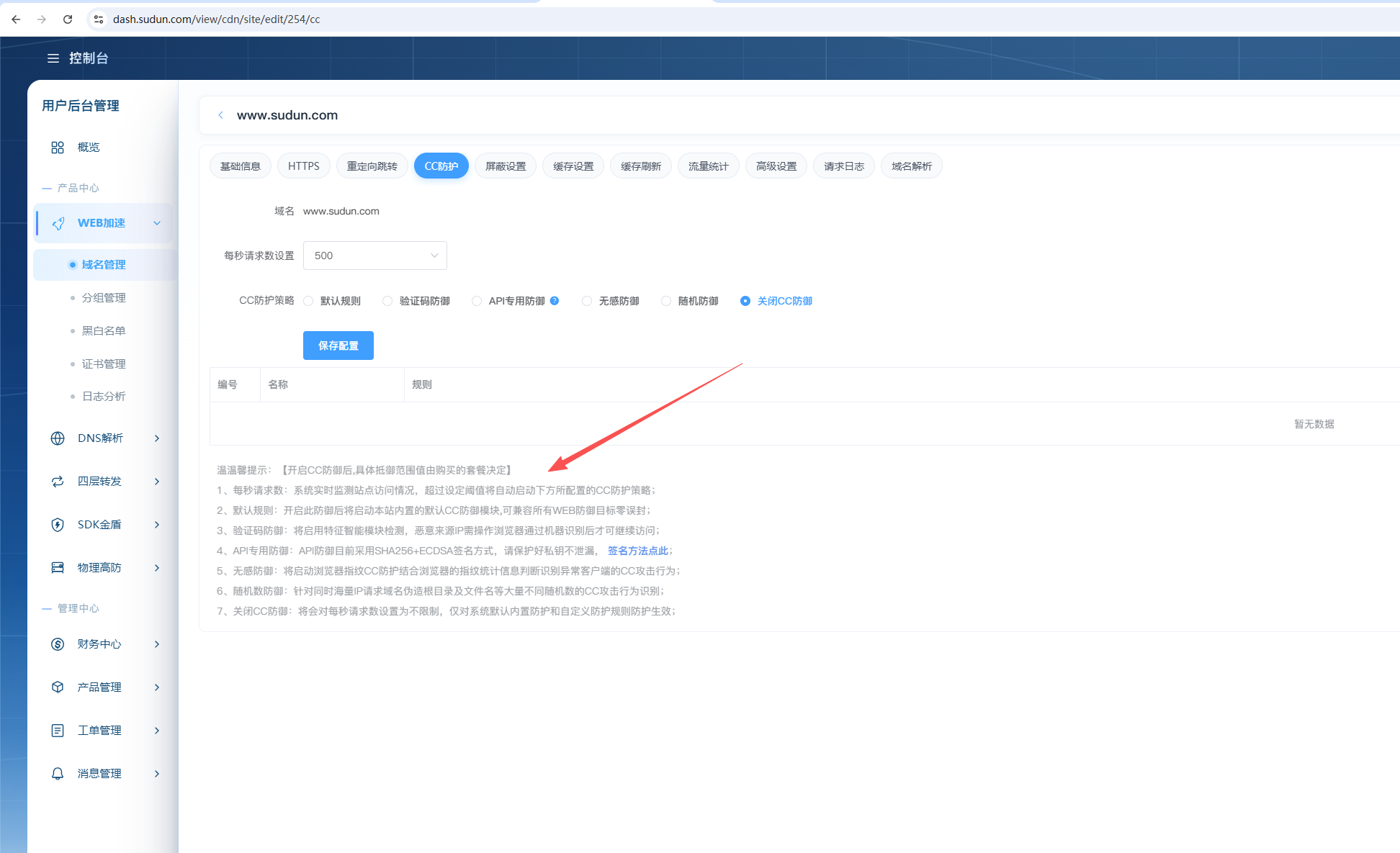
1. Number of requests per second: The system monitors site access in real time, and the CC protection policy configured below will be automatically activated if the set threshold is exceeded;
2. Default rule: After turning on this defense, the default CC defense module built into this site will be started, which is compatible with all WEB defense targets with zero error sealing;
3. Verification code defense: Feature intelligence module detection will be enabled, and the malicious source IP needs to be recognized by the browser before continuing to access;
4. API-specific defense: API defense currently adopts SHA256 + ECDSA signature method, please protect the private key from leakage.
5. Non-inductive defense: Start the browser fingerprint CC protection combined with the browser's fingerprint statistics to determine and identify the CC attack behavior of abnormal clients;
6. Random number defense: CC attack behavior identification for a large number of different random numbers such as forged root directories and file names for a large number of IP requests at the same time;
7. Turn off CC defense: The number of requests per second will be set to unlimited, and only the system's default built-in protection and custom protection rules will take effect;