





The customers and audiences of the website are domestic and do not want foreign access; or the webmaster detects that foreign broilers have been scanning or attacking. At this time, it is necessary to filter and block overseas IPs; there are generally two methods for filtering and blocking IPs: adding white and
Black.加白就是把允许访问的添加入白名单中,没在白名单中的都进行屏蔽过滤,不允许访问;加黑就是把不允许访问的加入到黑名单中,没在黑名单中的完全放开,都可以进行访问。如
If you need to directly block the designated country area, just click Block Settings and tick the designated country, then that country will no longer be allowed to access the domain name in your access to the Speed Shield cdn system. As shown in the figure:
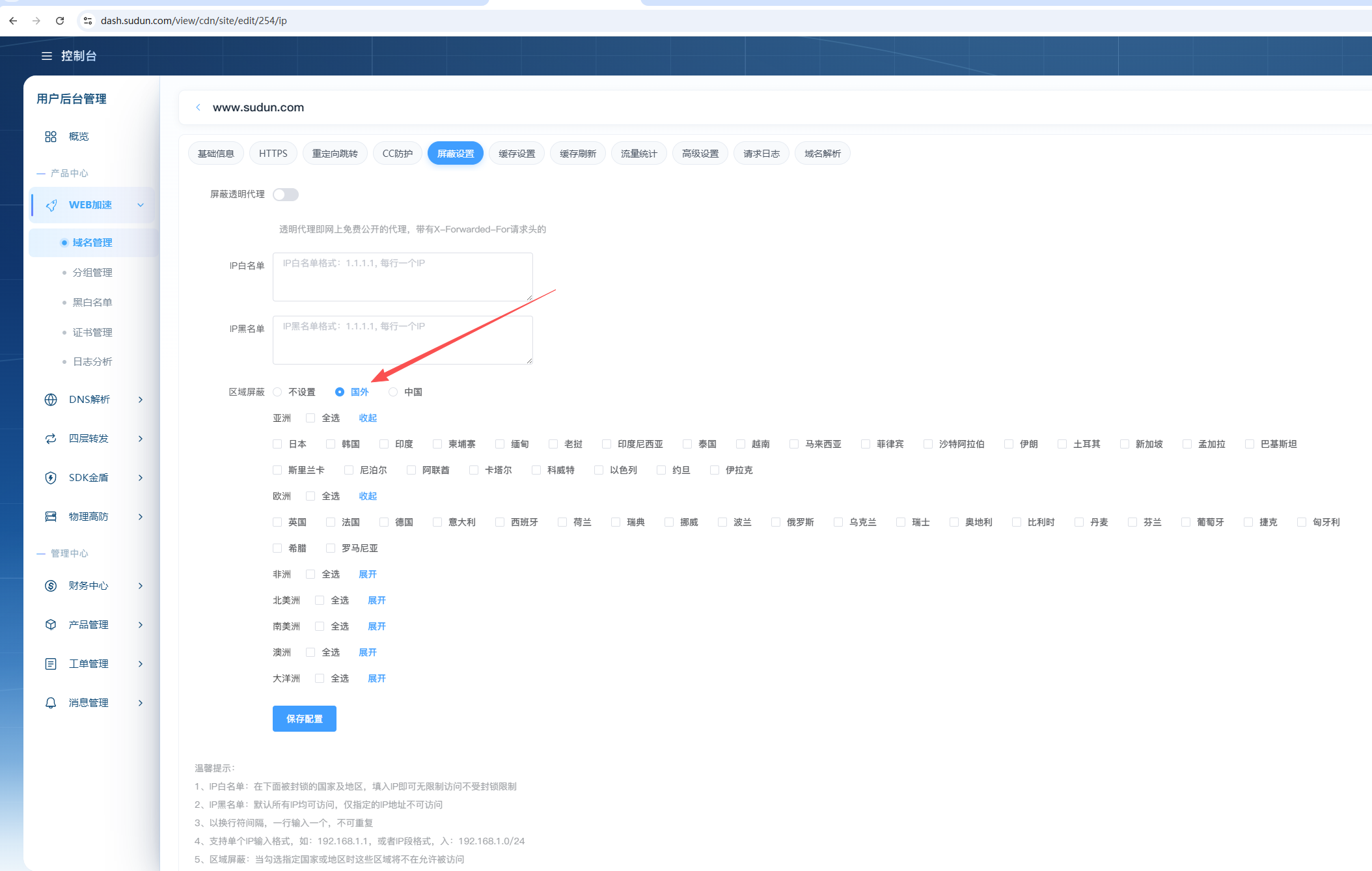
1. IP whitelist: In the blocked countries and regions below, fill in the IP to have unlimited access without blocking restrictions
2. IP Blacklist: All IPs are accessible by default, only the specified Internet Protocol Address is not accessible
3. Enter one line at a newline interval, which cannot be repeated
4, support a single IP input format, such as: 192.168.1.1, or IP segment format, into: 192.168.1.0/24
5. Area blocking: When checking the specified country or region, these areas will no longer be allowed to be accessed